


Navigating through tax season can be a daunting task, especially when confronted with numerous tax slips and forms. One essential slip Canadian employees need to understand is the T4 Slip – the Statement of Remuneration Paid. This slip encapsulates your income and deductions for the year, laying the groundwork for your tax return.
In this guide, we’ll unravel the T4 slip box by box, making the complex simple and ensuring you’re well-prepared to tackle your taxes.
Box 14: Employment Income
The first box on your T4 Slip is a straightforward yet crucial one – it represents your total employment income before deductions. This is the gross amount you earned during the tax year from your employer.
What You Should Know:
Your employment income is the foundation for calculating your income tax and understanding your financial standing. It’s essential to ensure the amount in Box 14 accurately reflects your earnings to avoid any discrepancies in your tax filing.
What You Should Do:
Verify the amount in Box 14 with your pay stubs or other employment records. If there’s a mismatch, promptly contact your employer to rectify the issue before proceeding with your tax return.
T4 Box 20: Registered Pension Plan (RPP) Contributions
Box 20 encapsulates your contributions to a Registered Pension Plan (RPP) over the tax year.
What You Should Know:
The amount in Box 20 reflects your investment towards your retirement savings under an RPP. It’s crucial for tax purposes as it can lower your taxable income, thereby potentially reducing your tax liability.
What You Should Do:
Ensure to report the amount in Box 20 on line 20700 of your tax return. If you notice discrepancies between your records and the amount reported in Box 20, reach out to your employer for clarification.
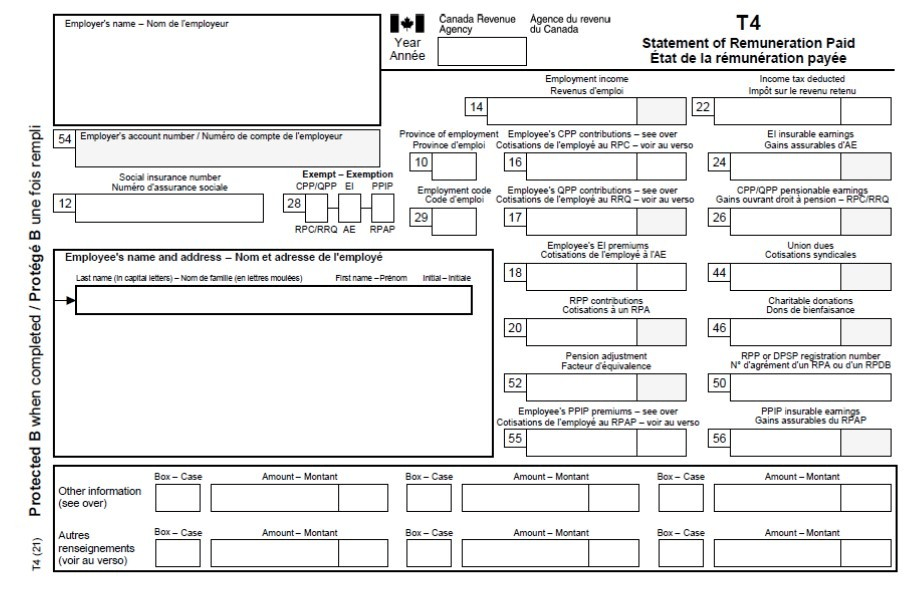
Box 22: Income Tax Deducted
Box 22 on the T4 slip represents the total amount of income tax that was deducted from your earnings over the tax year.
What You Should Know:
This amount is directly remitted to the Canada Revenue Agency (CRA) on your behalf, acting as a pre-payment towards your annual tax obligation.
What You Should Do:
Ensure to enter the amount from Box 22 on line 43700 of your tax return. Cross-verify this amount with your pay stubs to ensure accuracy, and if there’s a discrepancy, contact your employer to rectify the information.
Box 24: Employment Insurance (EI) Insurable Earnings
Box 24 delineates the total earnings that are subject to Employment Insurance premiums.
What You Should Know:
This box represents the amount on which your Employment Insurance (EI) premiums are calculated. It’s pivotal for both you and your employer to know the insurable earnings to ascertain the EI premiums accurately.
What You Should Do:
Verify the amount listed in Box 24 with your pay records to ensure accuracy. Any discrepancies should be reported to your employer for correction.
Box 26: CPP/QPP Pensionable Earnings
Box 26 reflects the total earnings subject to Canada Pension Plan (CPP) or Quebec Pension Plan (QPP) contributions.
What You Should Know:
This amount is crucial as it determines the contributions towards your pension plan, which impacts your retirement savings.
What You Should Do:
Ensure the accuracy of the amount in Box 26 by cross-verifying it with your pay stubs. Report any discrepancies to your employer for correction.
Further Boxes: Understanding The Rest
The T4 slip comprises various other boxes, each with its unique information and implications for your tax return. These include deductions, taxable benefits, and other amounts relevant to your financial and tax situation.
- For example, Box 45 is used for employer-offered dental benefits for the calendar year 2023 and after. It indicates whether the employee or any family members were eligible, as of December 31 of that year, to access any dental care insurance or coverage of dental services offered by the employer.
- Box 46 reports charitable donations, and Box 85 lists employee-paid premiums for private health service plans.
It’s important to be familiar with each of these boxes and understand their relevance to your overall financial and tax situation.
PayEvo T4 Generation
If you’re using PayEvo for your payroll, you don’t need to worry about anything related to year-end. Our processes are simple, fast, and stress-free to allow you to get back to what you’re best at. See how you can generate and submit T4s in under 10 minutes here.
Conclusion
Armed with this knowledge, you’re now better prepared to navigate tax season confidently. Remember, accuracy, or signing up for a free trial of PaymentEvolution in reporting and understanding your T4 slip is key to a smooth tax filing process.


