

Payroll has come a long way. What used to mean hours of spreadsheets, manual calculations, and paper cheques has now become a seamless, digital, and empowering experience. For small teams, this evolution is game-changing. You can now access the same payroll and payment capabilities that big enterprises rely on, without the big-business costs.
We’ll explore the evolution of payroll, how it’s shifting from transactional to transformational, and how industries like finance, architecture, healthcare, education, and accounting are using it to scale smarter.
From “Cutting Cheques” to Strategic Payroll
For decades, payroll was seen as a back-office function, time-consuming, error-prone, and resource-heavy. Bulky systems often demanded large HR teams or expensive outsourcing.
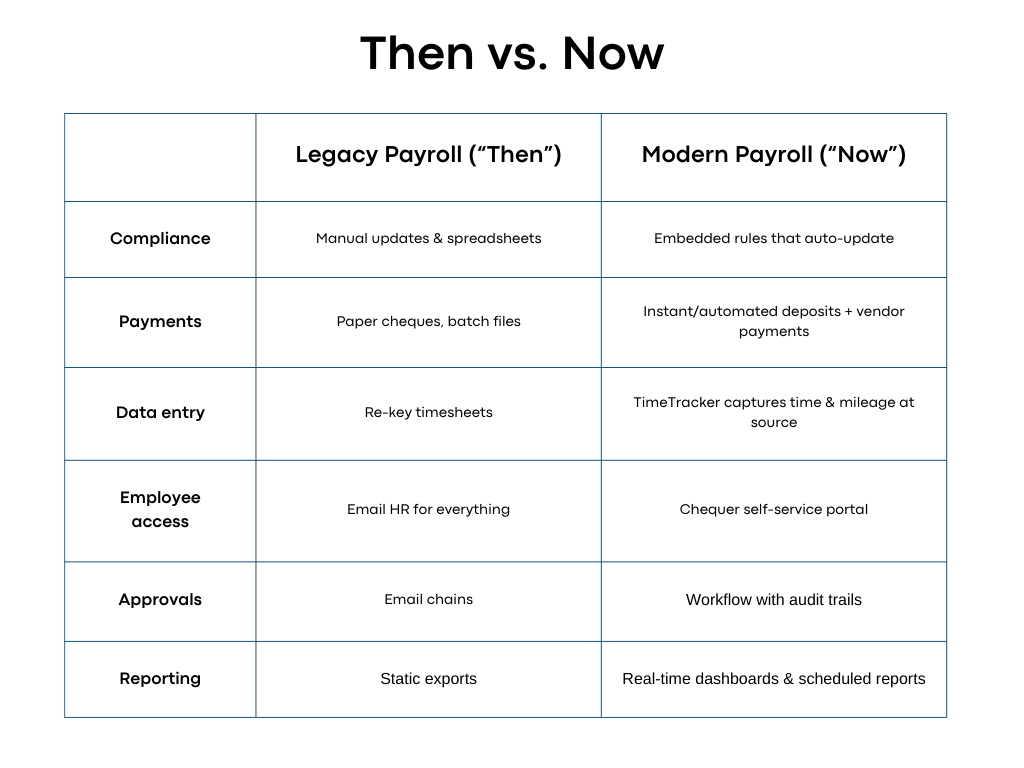
What modern payroll delivers
- Automated compliance & filings: Reduce penalties and rework.
- Cloud-native delivery: No servers, no upgrades, access anywhere.
- Integrated payment rails: Direct deposits, same-day pay options, vendor payments, and automatic reconciliation.
- Employee self-service: Tools like Chequer give staff instant access to pay stubs, tax forms, banking details, and time-off balances, dramatically lowering inbound questions.
Payroll has shifted from being purely administrative to becoming a strategic value for growth, employee satisfaction, and business differentiation.
Scale Headcount Without Scaling Costs
Historically, growth meant more HR staff or pricey providers. Today, a 10-person team can operate like a 1,000-person enterprise by standardizing repeatable work.
Four levers that do the heavy lifting
1. Automation first: Recurring earnings, deductions, and remittances run on rules, not manual updates.
2. Compliance in the system: Legislative changes are embedded once, applied everywhere.
3. Capture data where it starts: TimeTracker records time, mileage, and job codes at the source, cutting re-keying and disputes.
4. Workflow that scales: Create approval paths (e.g., Supervisor → Finance) so adding people doesn’t add email threads.
Mini-scenario: An architecture firm grows from 8 to 22 staff across two provinces/states. By enabling TimeTracker for site hours, using Workflow for overtime approvals, and auto-filing remittances, payroll run time stays ~30 minutes, despite nearly tripling headcount.
Payroll as a Driver to Employee Wellbeing
Payroll is no longer just “money out.” It’s a way to create better outcomes for employees. By integrating payroll with health, financial, and education benefits, businesses of all sizes can support their people in more meaningful ways.
Here are high-impact options that can be a key differentiator
- Health Spending Accounts (HSA): Let employees cover everyday medical costs not included in public or base plans; funded and tracked through payroll.
- Retirement contributions: Auto-deduct and match—employees see long-term value every payday.
- Tuition & training reimbursement: Encourage upskilling with simple, rules-based payroll reimbursements.
- Financial wellness tools: Budgeting, savings nudges, and pay transparency increase trust.
Why this matters: Replacing an employee is expensive (many HR analyses estimate around a third of salary, often more for specialized roles). Practical, flexible benefits lower churn, raise engagement, and pay for themselves through retention and productivity.
Turning Wellbeing Into Action
You don’t need an enterprise benefits team. Use payroll as the operating system.
A simple rollout plan
1. Start with an HSA: Define an annual allowance, eligibility, and auto-funding rules.
2. Add retirement next: Enable employer match thresholds (e.g., 3–5%) and show contributions on each pay stub.
3. Offer learning credits: Reimburse job-relevant courses with Workflow-based approvals.
4. Make it visible: In Chequer, employees see balances, claims, and contributions without emailing HR.
Admin stays light: Cloud systems handle deductions, caps, carry-over, and reporting. Finance can export clean summaries for audits and board reviews.
What “Good” Looks Like
· Payroll run time per cycle: Target < 45 minutes for up to ~25 employees.
· Error rate per cycle: Aim for zero; investigate any off-cycle payments.
· Cost per pay (all-in): Total payroll ops cost ÷ number of employees paid.
· Self-service adoption: % of employees using Chequer monthly (higher = fewer tickets).
· On-time filings: 100%, non-negotiable.
· Benefits utilization: HSA usage rate, retirement participation, course reimbursements.
Real-World Style Examples
Design studio (10 employees):
Problem: Late timesheets, frequent bank detail changes.
Fix: TimeTracker mobile capture; Chequer for banking updates.
Result: Payroll questions drop ~70%; no missed deposits.
Healthcare clinic group (28 employees):
Problem: Multi-site schedules and overtime approvals.
Fix: Location-based job codes; Workflow for OT approvals.
Result: Clean overtime calculations and faster month-end reconciliation.
Accounting firm (12 employees + contractors):
Problem: Vendor payments and contractor T4A/1099 prep.
Fix: Integrated vendor payments; contractor profiles with automated year-end forms.
Result: Fewer tools, one source of truth for payouts and compliance.
Common Pitfalls (and Easy Fixes)
- Pitfall: Spreadsheets for time & mileage.
- Fix: Turn on TimeTracker; require project codes at entry.
- Pitfall: Ad-hoc approvals living in email.
- Fix: Standardize in Workflow; audit trail by default.
- Pitfall: Benefits with manual ledger updates.
- Fix: Manage HSAs and reimbursements inside payroll; automate caps and deductions.
- Pitfall: One HR “super-admin.”
- Fix: Role-based permissions: Finance runs reports, managers approve time, employees self-serve.
30-Day Quick Start
Week 1 – Foundation: Import employees, set pay groups, connect bank accounts, enable Chequer.
Week 2 – Capture: Roll out TimeTracker; train managers on approvals; pilot with one team.
Week 3 – Automate: Configure taxes/remittances, standard earnings & deductions, and Workflow.
Week 4 – Benefits: Launch an HSA and retirement contributions; publish a 1-page employee guide.
Goal: By Day 30, your payroll runs reliably in under an hour with self-service live and benefits visible in the portal.
Why This Matters for Growth
Modern payroll is about trust, financial wellness, and operational leverage. Small teams that adopt cloud payroll:
· Save hours of admin every week.
· Retain employees with transparency and on-time accuracy.
· Unlock enterprise features, automations, approvals, analytics, without enterprise cost.
With platforms like PaymentEvolution, small organizations in finance, architecture, healthcare, education, and accounting run payroll with big-business power while staying agile, affordable, and people-focused.
Payroll doesn’t need to be glamorous, it just needs to work. When it does, you stop chasing paperwork and start chasing opportunity.
FAQ
What is enterprise-grade payroll for small businesses?
A cloud system that automates compliance, integrates payments and benefits, and gives employees self-service—so a 10-person team runs payroll like a 1,000-person enterprise.
How do HSAs work with payroll?
You set an allowance and eligibility; payroll manages funding, claims, and deductions so employees can cover everyday medical costs not included in base plans.
How can I reduce payroll errors?
Capture time at the source (TimeTracker), standardize approvals (Workflow), and enable employee self-service (Chequer) to eliminate re-keying and last-minute changes.
What KPIs prove ROI?
Run time per cycle, error rate, cost per pay, self-service adoption, on-time filings, and benefits utilization.


